pve导入cloud-image创建虚拟机
pve导入cloud-image创建虚拟机
Debian 官方云镜像的目的是:让用户能安全、稳定、快速地在各种云平台上使用原汁原味的 Debian 系统
Debian官方介绍:https://cloud.debian.org/images/cloud/
Debian官方下载云镜像:https://cloud.debian.org/images/cloud/bookworm/
- 获取qcow2云镜像
从中科大镜像站获取最新版本云镜像:https://mirrors.ustc.edu.cn/debian-cdimage/cloud/bookworm/
- 上传云镜像到pve的根目录
root@pve:~# ls -lh
total 331M
-rw-r--r-- 1 root root 331M Aug  9 00:15 debian-12-genericcloud-amd64-20250804-2194.qcow2
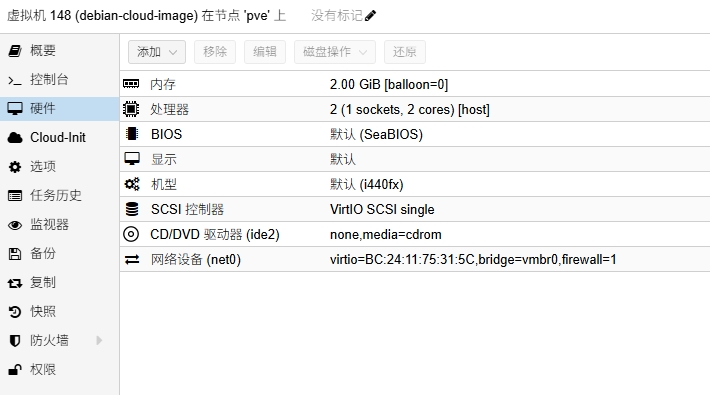
- 创建虚拟机
注意不要添加磁盘
- 导入qcow2云镜像
注意:我这里data(原来是local-lvm),148是上面创建虚拟机的id
qm importdisk 148 /root/debian-12-genericcloud-amd64-20250804-2194.qcow2 data --format=qcow2
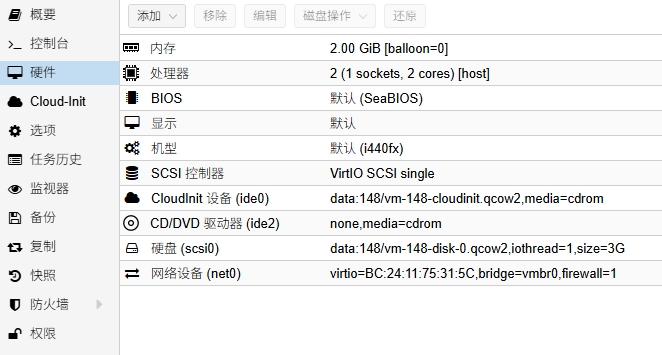
- 调整虚拟机硬件配置
启用上面添加的qcow2磁盘,增加clout-init设备
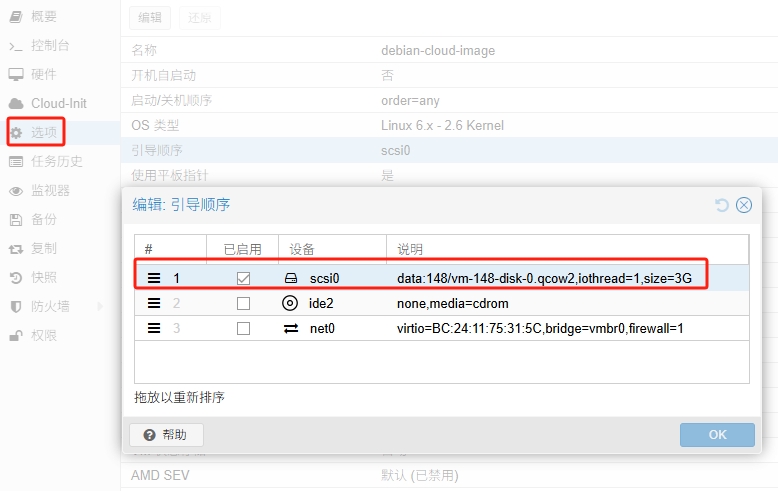
- 调整虚拟机选项配置
只启用qcow2磁盘引导
注意:要启用选项的QEMU Guest Agent,允许宿主机(Proxmox)与虚拟机之间进行更多的通信和控制操作
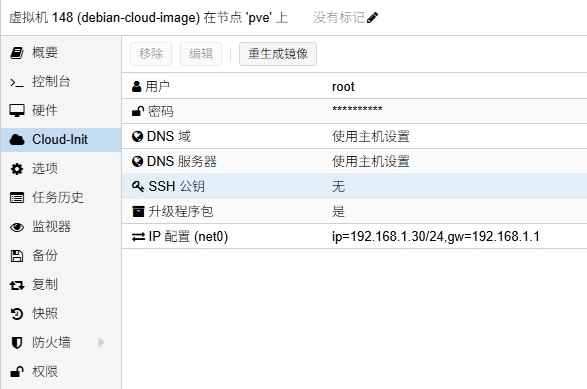
- cloud-init配置用户密码和ip
注意:先配置用户密码和ip,用户一定要设置,默认空会无效,最后一定点一下重生成镜像
这里是使用cloud-init配置虚拟机的用户信息和网络信息,在虚拟机开机时会自动执行生效
- 启用ssh
编辑ssh配置文件
nano /etc/ssh/sshd_config
把这两行启用并改为yes
#允许使用root用户通过SSH登录系统
PermitRootLogin yes

#允许通过密码方式进行 SSH 登录
PasswordAuthentication yes
重启ssh
systemctl restart ssh
- 换源
编辑仓库源配置
nano /etc/apt/sources.list.d/debian.sources
内容如下
Types: deb
URIs: http://mirrors.ustc.edu.cn/debian
Suites: bookworm bookworm-updates
Components: main contrib non-free non-free-firmware
Signed-By: /usr/share/keyrings/debian-archive-keyring.gpg

Types: deb
URIs: http://mirrors.ustc.edu.cn/debian-security
Suites: bookworm-security
Components: main contrib non-free non-free-firmware
Signed-By: /usr/share/keyrings/debian-archive-keyring.gpg
更新索引
apt update
- 安装qemu-guest-agent
apt install qemu-guest-agent -y
重启检查pve虚拟机的概要界面ip是否正常显示
- 制作模板
把这个虚拟机转化为模板,方便以后使用
- 磁盘扩容
需完整克隆虚拟机